 Skip to content
The cloud shared responsibility model is one of the most misunderstood concepts in enterprise IT today. The gap between what you think is protected and what actually is could cost you everything.
The moment your organization moved towards services, like Microsoft 365, AWS, Azure, or Google Cloud, you entered into a legal and operational agreement where you remain responsible for protecting your own data.
The cloud provider gives you infrastructure, availability, and uptime. Your data- its integrity, recoverability, long-term retention, and regulatory compliance – that’s on you.
Microsoft explicitly recommends customers use third-party backup solutions for their Microsoft 365 data. AWS, Google Cloud, and Azure each publish shared responsibility documentation making the same point. And yet, survey after survey shows that the majority of businesses assume their cloud vendor is handling backup. They are not.
Let’s break down shared responsibility model in cloud in simple language.
The Cloud Shared Responsibility Model: What It Actually Means
Cloud providers have developed a “shared responsibility model”. It’s a framework that defines which security and data management obligations belong to the provider, and which remain with the customer.
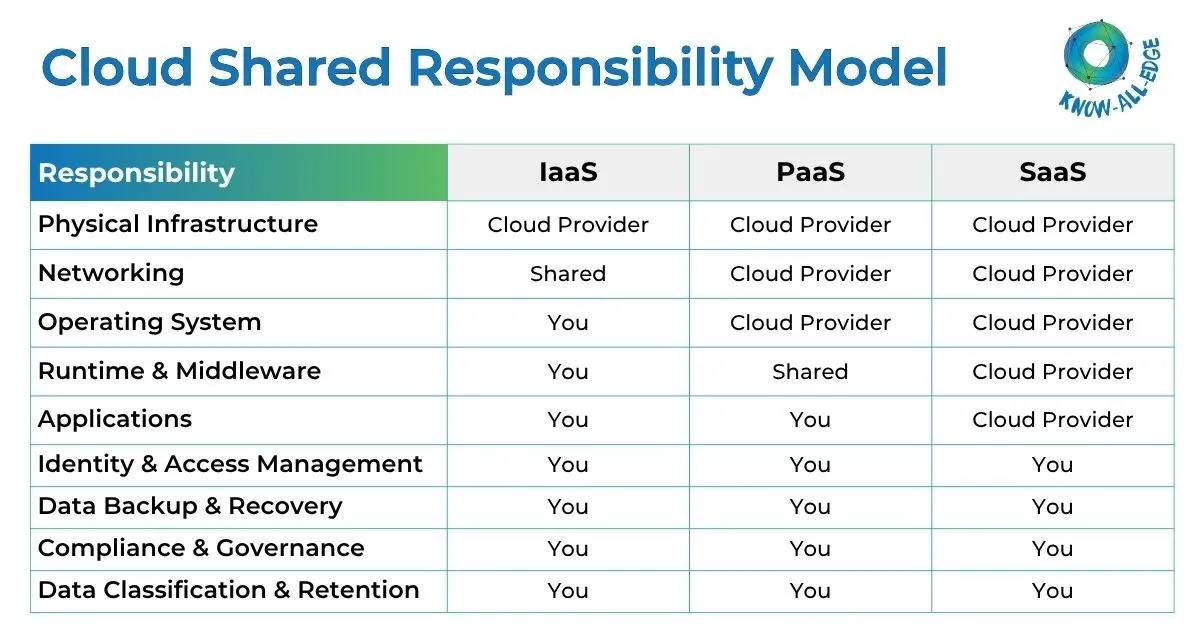
The model varies depending on how you consume cloud services, broadly categorized into three tiers:
- Infrastructure as a Service (IaaS): You manage virtual machines, operating systems, and applications. Think Azure Virtual Machines, Amazon EC2, or Google Compute Engine. Here, the provider secures the physical layer. Everything above the hypervisor, like patching, configuration, and data protection is your responsibility.
- Platform as a Service (PaaS): You deploy applications without managing underlying VMs or OS. Examples include Azure App Service, Google Kubernetes Engine, BigQuery. The provider now owns more of the stack, but you still own application-level controls, identity management, and crucially, your data.
- Software as a Service (SaaS): Ready-made applications: Microsoft 365, Google Workspace, Salesforce. The provider manages nearly everything at the infrastructure level. But your data, your access controls, and your compliance obligations is still yours.
This last category is where the most dangerous assumptions live. Because SaaS feels the most managed. You log in, it works, someone else clearly runs it, and users and organizations tend to assume that “someone else” also protects their data from deletion, ransomware, legal holds, and retention requirements. They don’t.
“For all cloud deployment types, you own your data and identities. You’re responsible for protecting the security of your data and identities, on-premises resources, and the cloud components you control.”
– Microsoft Azure: Shared Responsibility in Cloud
The Microsoft 365 Illusion: What’s Actually Protected
Microsoft 365 is one of the world’s most widely used productivity platforms and Microsoft does a strong job managing the infrastructure, uptime, and availability behind it. If a server fails, your services usually continue running without interruption.
What Microsoft does not fully guarantee is long-term backup and recovery of your data, and that is where many organizations get confused.
- If an employee accidentally deletes emails or SharePoint data, recovery windows are limited, typically 30 to 93 days depending on the service and license. After that, the data may be permanently lost.
- If ransomware encrypts OneDrive or SharePoint files, version history may help, but advanced attacks are designed to bypass or corrupt those versions.
- Insider threats and misconfigured retention policies can also lead to permanent data loss.
Microsoft’s own agreements make this clear: Microsoft keeps the platform running, but protecting and backing up your data remains your responsibility.
Risk Exposure: A single ransomware event, accidental deletion, or insider threat incident against unprotected M365 data can result in permanent data loss with no recourse through the provider.
The Big Three: How AWS, Azure, and Google Cloud Each Handle This
The pattern repeats across every major cloud provider. The specifics differ, the language differs, but the fundamental division is the same: the provider protects the infrastructure; the customer protects the data.
Microsoft Azure
The shared responsibility model in Azure clearly defines which security and data protection responsibilities belong to Microsoft and which remain with the customer.
Microsoft clearly defines responsibility across IaaS, PaaS, and SaaS models. While Azure manages the infrastructure and platform, customers remain responsible for protecting their own data across every layer.
For SaaS services like Microsoft 365, Microsoft keeps the application running, but backup, recovery, retention, and compliance remain the customer’s responsibility. Azure offers tools like Azure Backup and Azure Site Recovery, but they must be configured, managed, and operated by the customer.
Amazon Web Services
The shared responsibility model in AWS is often summarized as:
“Security of the cloud” vs “Security in the cloud”
AWS secures the physical infrastructure, hardware, networking, and global cloud environment. Customers are responsible for everything deployed inside it, including:
- Operating systems
- Applications
- Network configurations
- Data protection
- Backup and recovery
For services like Amazon S3, AWS provides capabilities like versioning and replication, but enabling and managing them is still the customer’s responsibility.
Google Cloud
It expands the Google cloud shared responsibility model with a concept called:
“Shared Fate”
This approach encourages stronger security defaults and better customer guidance. However, Google still makes it clear that customers remain responsible for:
- Data protection
- Access controls
- Backup policies
- Compliance requirements
- Security configurations
Google also highlights that most cloud breaches happen because of misconfiguration, not infrastructure failure. In other words, the platform may be secure, but incorrect customer configurations can still expose critical data. This is why many organizations are adopting zero trust and continuous cloud posture management strategies to reduce exposure from human error and over-permissioned access.
The Compliance Dimension: Why This Gets Legally Serious
Cloud compliance responsibilities do not transfer to your provider. Whether your organization falls under GDPR, HIPAA, PCI DSS, or India’s DPDPA, the responsibility for protecting and recovering data still belongs to you.
When regulators ask how your organization secures, retains, and recovers data, “Microsoft manages our cloud” is not enough. You must be able to demonstrate:
- Where your data is stored
- How it is protected
- How long it is retained
- How it can be recovered after an incident
A cloud provider’s uptime SLA does not replace backup, recovery, or compliance obligations.
India’s DPDPA
Under India’s Digital Personal Data Protection Act (DPDPA), organizations handling personal data must implement appropriate security and recovery measures. If your Microsoft 365 environment contains Indian citizens’ data, backup, recoverability, and compliance responsibilities remain with your organization, not Microsoft.
Why Native Tools Aren’t Enough
Microsoft, AWS, and Google all provide native recovery features like recycle bins, version history, retention policies, and litigation holds. To be fair, these tools are useful, but they are not complete backup solutions.
Native tools have major limitations:
- Limited recovery windows
- No true air-gapped protection
- Weak ransomware recovery capabilities
- Dependence on pre-configured retention policies
- Fragmented recovery across workloads
Version history is not backup. If ransomware encrypts files over time, users permanently delete data, or retention policies are misconfigured, recovery can become difficult, or impossible.
Most organizations also manage multiple Microsoft 365 services like Exchange, Teams, SharePoint, OneDrive, and Dynamics 365. Native tools handle these separately, making unified recovery difficult during a real incident.
A dedicated third-party backup strategy is designed to fill these gaps.
What a Strong Cloud Backup & Recovery Strategy Should Include
Whether you use Microsoft 365, AWS, Azure, or Google Cloud, the responsibility for protecting your data still belongs to your organization. A modern cloud backup strategy should go beyond basic recovery features and focus on cyber resilience, recoverability, and compliance.
Key capabilities to look for include:
- Unified protection across Exchange, Teams, SharePoint, OneDrive, and Dynamics 365
- Air-gapped backup storage isolated from production environments
- Granular point-in-time recovery
- Flexible retention and scheduling policies
- Fast restore capabilities during incidents
- eDiscovery and legal hold support for compliance requirements
These capabilities become critical during ransomware attacks, accidental deletions, insider threats, or regulatory investigations.
Leading Cloud Backup & Recovery Platforms
Several enterprise-grade platforms provide dedicated backup and recovery solutions across Microsoft 365, AWS, Azure, Google Cloud, and hybrid environments.
Commvault
Enterprise-grade cyber resilience platform with broad multi-cloud coverage, air-gapped protection, ransomware recovery, and policy-driven backup management.
Veeam
Widely used backup platform supporting virtual, physical, cloud, and Microsoft 365 environments with strong recovery and replication capabilities.
Acronis
Combines backup, disaster recovery, and ransomware protection into a unified cyber protection platform.
Druva
SaaS-native backup and data protection platform designed for cloud-first organizations with simplified infrastructure management.
Rubrik
Focuses on zero-trust data security, immutable backups, ransomware recovery, and cloud-native protection.
Cohesity
Provides centralized backup, recovery, and data management across hybrid and multi-cloud environments.
There is no one-size-fits-all solution. The right platform depends on your cloud environment, compliance requirements, recovery objectives, and operational model.
The Bottom Line
The cloud shared responsibility model is how every major cloud platform actually operates. Microsoft, AWS, Azure, and Google Cloud provide the infrastructure and keep services running, but protecting your data is still your responsibility. Even when native backup tools are available, they often have limitations, especially for SaaS platforms like Microsoft 365.
Organizations that understand this are better prepared to recover from ransomware, accidental deletion, and compliance incidents. Those that assume the cloud provider “handles everything” often realize the gap only after something goes wrong.
You own your data. The question is whether you are protecting it properly.
Not Sure Where Your Backup Gap Is?
Know All Edge helps organizations assess cloud security gaps across Microsoft 365, AWS, Azure, and multi-cloud environments, and implement the right backup and disaster recovery and solutions based on their operational and compliance needs.
Whether you are strengthening cloud data visibility, improving recoverability, or building a more resilient security architecture, our team helps design and deploy solutions that actually close the gap.
Let’s talk.
FAQs on Cloud Shared Responsibility
What are the shared responsibilities of cloud?
In the cloud, responsibility is split between the provider and the customer, but never equally. The provider owns the physical infrastructure: datacentres, hardware, networking, and hypervisors. The customer always owns their data, user identities, access controls, and endpoints. Depending on the service model, responsibilities like OS patching, application security, and network configuration shift between the two. What never shifts: your data is your responsibility. A provider keeping the lights on does not mean they are protecting what is inside.
What is shared responsibility in IaaS, PaaS, and SaaS?
The service model determines how much you manage.
- IaaS: You control almost everything above the hardware: OS, applications, network config, and data protection. The provider handles physical infrastructure only.
- PaaS: provider takes the OS and runtime off your plate. You still own your application code, configurations, and data.
- SaaS: The provider runs the entire application. But your data, your identities, and your compliance obligations? Still entirely yours.
The higher you go in the stack, the less infrastructure you manage, not the less accountability you carry.
What does the Microsoft 365 shared responsibility model show?
It shows that Microsoft is responsible for keeping the service running, not for fully protecting your data inside it. Microsoft manages uptime, infrastructure, and application availability. You are responsible for your emails, files, Teams messages, and SharePoint content.
If data is deleted, corrupted, or encrypted by ransomware, Microsoft’s native recovery window is limited. Microsoft also recommends third-party backup for M365. The model makes one thing clear: your licence gives you access to the platform, not guaranteed data protection.
What is a shared responsibility matrix?
A shared responsibility matrix maps security and operational responsibilities, such as data protection, identity management, patching, compliance, and network controls, between the cloud provider and the customer.
The matrix changes depending on the deployment model (IaaS, PaaS, SaaS) and the provider. Organizations use it to identify gaps, assign ownership, and avoid assumptions about who is responsible for critical security functions.


