 Skip to content
There’s a moment every legal or security team fears of! It’s when anyone from the legal department can come and ask for all emails and Teams messages from particular five people, going back two years. In an instant, ordinary IT concern can quickly turn into a major business risk.
If your organization relies on Microsoft 365, as many businesses do today, eDiscovery Office 365 is the capability that helps you stay in control when investigations, audits, or legal requests arise. Understanding how it works is essential for operational readiness.
This guide breaks down everything you need to know: what eDiscovery in Office 365 actually is, how it works under the hood, what the real-world limitations are, and how organizations can use it effectively without falling into the traps that most documentation conveniently leaves out.
What Is eDiscovery in Office 365?
At its core, electronic discovery, or eDiscovery, is the process of identifying, preserving, collecting, reviewing, and producing electronically stored information (ESI) for use in legal proceedings, regulatory investigations, or internal inquiries.
Microsoft 365 eDiscovery helps organizations search for relevant data, place legal holds on content, and export information for review.
This is what is eDiscovery Office 365, fundamentally, a built-in compliance and investigation capability woven into the Microsoft ecosystem.
The supported data sources are extensive. eDiscovery in Microsoft 365 can reach across:
- Exchange Online mailboxes
- Microsoft Teams messages and conversations
- SharePoint sites
- OneDrive accounts
- Microsoft 365 Groups
- Viva Engage (formerly Yammer)
This matters because modern business communication doesn’t live in one place. A single investigation might require pulling emails, chat threads, shared documents, and group conversations, often simultaneously. Having a unified search capability across all of these is a significant advantage over stitching together data manually.
Why eDiscovery Has Become Critical for Modern Organizations
Business data is no longer confined to email and file servers.
It now spans cloud platforms, collaboration tools, and remote work environments, creating new challenges for legal, compliance, and security teams. This growing complexity has made eDiscovery a critical business capability.
The Explosion of Digital Communication
Employees now communicate through emails, chats, video meetings, shared documents, collaborative workspaces, and cloud applications.
Finding a specific conversation or document manually can be nearly impossible without dedicated discovery capabilities.
Remote and Hybrid Work
Remote work has expanded the number of locations where business information is created and stored.
Teams chats, cloud documents, meeting transcripts, and shared workspaces often contain critical evidence that organizations must be able to locate quickly.
Increasing Regulatory Requirements
Data privacy regulations and industry compliance frameworks require organizations to maintain visibility into their data and demonstrate proper governance practices.
Regulators increasingly expect organizations to produce information quickly when requested.
Internal Investigations
Human Resources, legal departments, compliance teams, and security operations regularly investigate:
- Insider threats
- Data leakage incidents
- Policy violations
- Employee misconduct
- Intellectual property theft
Without eDiscovery capabilities, these investigations become significantly more difficult.
Litigation Readiness
When litigation occurs, organizations must preserve potentially relevant information and prevent accidental deletion.
Failure to do so can lead to penalties, sanctions, and reputational damage.
Simply put, a significant portion of today’s discoverable business information resides inside Microsoft 365. Organizations that cannot efficiently search and manage that data face substantial legal, operational, and compliance risks.
Understanding Microsoft Purview: The Platform Behind eDiscovery in Microsoft 365
Many professionals still associate compliance tools with the former Microsoft Compliance Center.
However, Microsoft consolidated its governance, compliance, risk management, and information protection capabilities under Microsoft Purview.
Microsoft Purview serves as the central platform for:
- Data governance
- Information protection
- Compliance management
- Insider risk management
- Data lifecycle management
- eDiscovery investigations
For eDiscovery workflows, Purview provides a centralized environment where organizations can create cases, manage custodians, preserve content, perform searches, review evidence, and export findings.
Rather than managing investigations across multiple Microsoft services individually, Purview provides a unified investigation framework.
Types of eDiscovery Available in Microsoft 365
Microsoft offers multiple levels of discovery functionality, allowing organizations to choose capabilities that align with their operational and compliance requirements.
Solution | Primary Purpose | Key Capabilities |
Content Search | Basic content discovery | Search across Microsoft 365 data and export results |
eDiscovery Standard | Case-based investigations | Cases, legal holds, search management, exports |
eDiscovery Premium | Advanced legal and compliance workflows | Review sets, analytics, OCR, conversation threading, custodians, predictive coding |
Key Features of eDiscovery Office 365 Worth Knowing
Let’s walk through the capabilities that matter most in practice, particularly for the Premium tier.
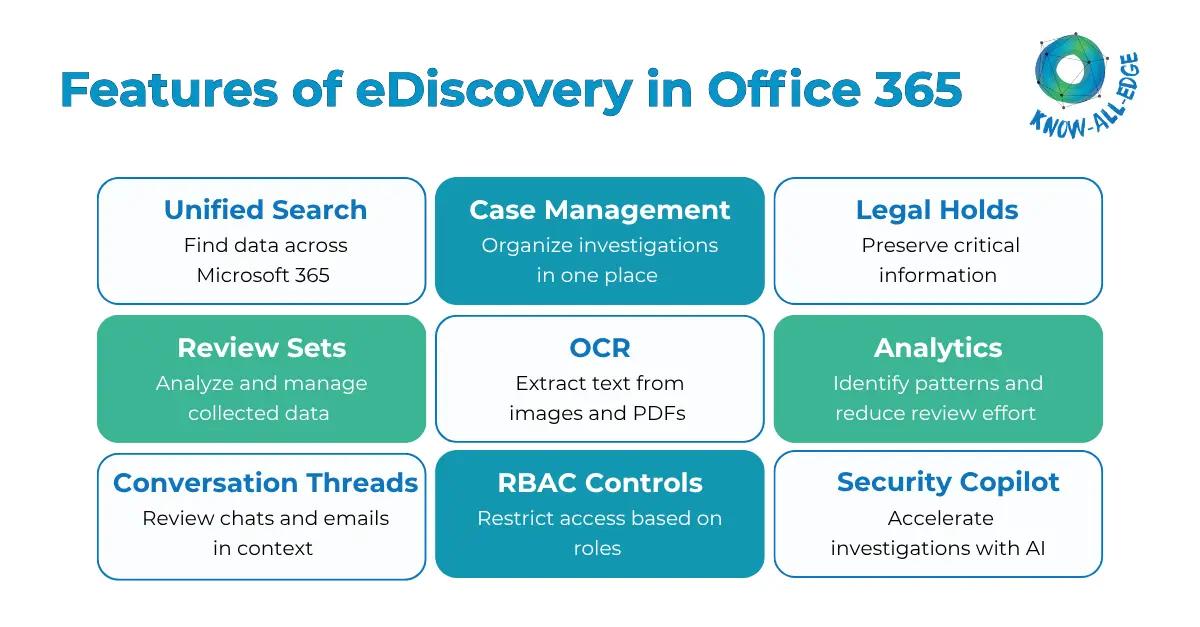
- Search Across Microsoft 365 Data Sources: Search emails, Teams chats, SharePoint sites, OneDrive accounts, and other Microsoft 365 data from a single platform.
- Case Management: Organize searches, holds, review activities, and exports within dedicated investigation cases.
- Legal Holds: Preserve relevant data to prevent it from being deleted or modified during an investigation.
- Review Sets: Collect and analyze relevant content in a secure review environment without affecting the original data.
- Optical Character Recognition (OCR): Make text within images, scanned documents, and PDFs searchable.
- Analytics and Near-Duplicate Detection: Reduce review time by identifying similar documents, grouping related content, and highlighting important patterns.
- Conversation Threading: Review complete email or chat conversations in context rather than individual messages.
- Role-Based Access Control (RBAC): Control who can access investigations and what actions they can perform.
- Security Copilot Integration: Use AI-powered assistance to create search queries and summarize content more efficiently.
How to Access eDiscovery Office 365
Licensing
Before using eDiscovery, organizations must have the appropriate Microsoft 365 licensing. Basic eDiscovery capabilities are available with select Microsoft 365 plans, while advanced features such as review sets, analytics, and OCR typically require Microsoft 365 E5 or relevant compliance add-ons. Verifying licensing requirements should be one of the first steps before starting an investigation.
Permissions
eDiscovery is accessed through Microsoft Purview, but users need the appropriate permissions to use it. Access is typically granted through the eDiscovery Manager role group, which allows authorized users to create and manage investigations.
Organizations can also assign administrator-level permissions to users who require broader visibility and control across all eDiscovery cases.
The best approach is to follow the principle of least privilege, granting only the level of access required for each user’s role. This helps protect sensitive investigation data while maintaining proper governance.
How to Perform eDiscovery in Office 365: A Step-by-Step Process
Understanding the theory is useful; knowing how to actually execute is what matters operationally. Here’s how to do eDiscovery in Office 365 in practice.
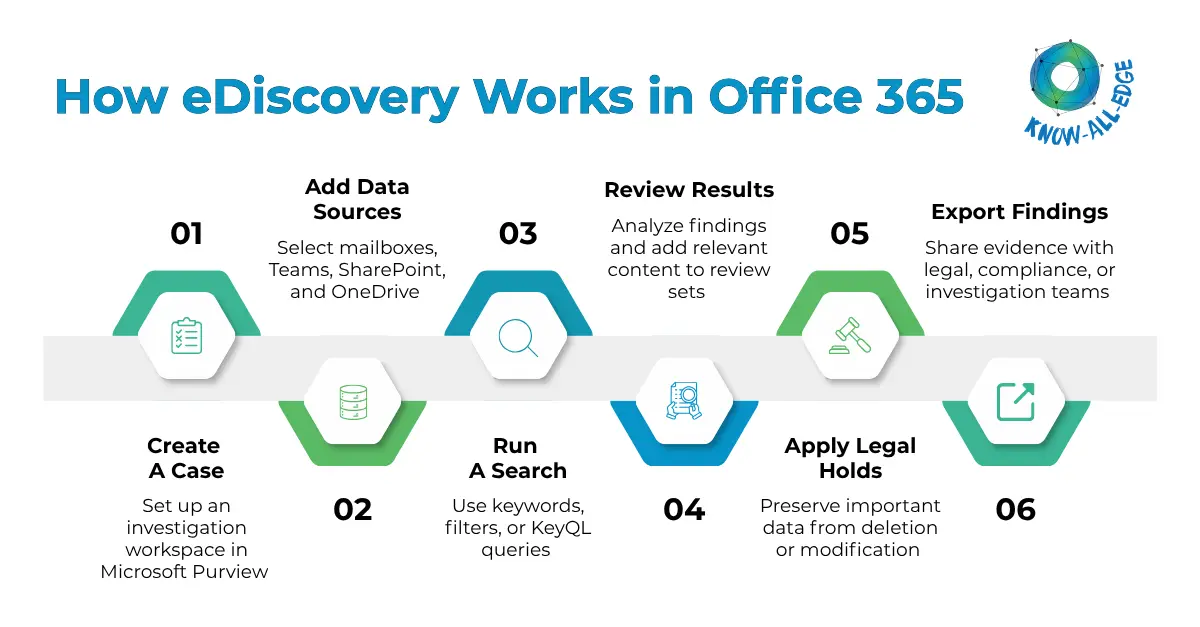
Step 1: Verify Licensing and Assign Permissions
Before starting, ensure your organization has the appropriate Microsoft 365 licensing for the eDiscovery features you need. You should also assign the relevant users to the eDiscovery Manager or eDiscovery Administrator role groups in Microsoft Purview. Without the right licenses and permissions, investigators won’t be able to access or manage eDiscovery cases.
Step 2: Create an eDiscovery Case
In Microsoft Purview, create a new case and give it a clear, descriptive name. This case becomes the central workspace for your investigation, where searches, holds, review activities, and exports are managed. Add investigators, legal team members, or other stakeholders who need access to the case.
Step 3: Identify and Add Data Sources
Next, determine which users, locations, and workloads are relevant to the investigation. Depending on the case, this may include Exchange mailboxes, OneDrive accounts, Teams messages, SharePoint sites, and Microsoft 365 Groups. In eDiscovery Premium, you can also include shared mailboxes, Teams channels, and other non-custodial data sources when required.
Step 4: Run an eDiscovery Search
This is the core of the eDiscovery process. Create a search using keywords, filters, date ranges, file types, custodians, or KeyQL queries. Once the search runs, review the results and search statistics to ensure the query is returning relevant information before moving forward. Refining searches at this stage can help reduce unnecessary review effort later.
Step 5: Review Search Results and Build Review Sets
After validating the search results, add the relevant content to a review set. This creates a controlled collection of data that investigators can search, filter, tag, and analyze without affecting the original content. Review sets make it easier to organize findings and focus on the most relevant information.
Step 6: Apply Legal Holds Where Required
If the matter involves litigation, compliance requirements, or regulatory investigations, apply legal holds to preserve relevant data. This prevents content from being deleted or modified while the investigation is ongoing and helps maintain a defensible process.
Step 7: Export and Share Findings
Once the review is complete, export the relevant content and share it with legal, compliance, HR, or investigation teams as needed. Proper documentation and reporting at this stage help ensure findings can be reviewed and acted upon effectively.
Challenges and Limitations of Microsoft 365 eDiscovery
While Microsoft Purview offers powerful capabilities, organizations should understand its limitations.
This is often where reality differs from product documentation.
Data Outside Microsoft 365
Most enterprises use far more than Microsoft applications.
Research consistently shows organizations operate dozens, sometimes hundreds, of SaaS platforms.
Important evidence may exist in:
- CRM platforms
- Messaging applications
- Development tools
- Security solutions
- Third-party cloud services
Microsoft eDiscovery primarily focuses on Microsoft-generated data.
Search Limitations
Although search capabilities are robust, some users encounter challenges with:
- Advanced query complexity
- Wildcard limitations
- Large-scale search performance
- Search result constraints
Investigators may need significant experience to build highly effective queries.
Partially Indexed Data
Some files may be partially indexed or difficult to process.
While advanced indexing has improved discoverability, organizations should still recognize that not all content is equally searchable.
Learning KeyQL
Microsoft relies on Keyword Query Language (KeyQL) for advanced searches.
Teams unfamiliar with KeyQL may face a learning curve before achieving optimal search precision.
Review Constraints
Compared with dedicated third-party eDiscovery platforms, review functionality can be less flexible for highly complex matters involving large document populations.
Production Challenges
Large-scale productions and advanced collaboration workflows may require additional tools, especially when external legal teams or third-party reviewers are involved.
These limitations do not diminish the value of Microsoft Purview. Instead, they highlight the importance of aligning discovery requirements with the right combination of technology, governance, and operational processes.
Best Practices for Organizations Getting Serious About eDiscovery
To get the most value from eDiscovery, organizations should establish the right processes and controls before an investigation occurs.
- Strengthen Data Governance: Understand what data you have, where it resides, and how long it should be retained. Solutions such as DSPM (Data Security Posture Management) can help improve visibility across your data environment.
- Define Legal Hold Procedures Early: Create a clear process for placing and managing legal holds before they are needed. Having a documented framework helps organizations respond faster and more effectively during legal or regulatory matters.
- Review Permissions Regularly: eDiscovery roles provide access to sensitive information. Regular audits help ensure permissions remain aligned with current responsibilities.
- Reduce Data Sprawl: As data spreads across multiple applications and platforms, investigations become more complex. Consistent retention policies and better data management can help reduce costs and improve efficiency.
- Align eDiscovery with Security and Compliance: eDiscovery works best when integrated with broader data protection (as per DPDPA, RBI and SEBI Guidelines), governance, and compliance initiatives. Maintaining strong backup and disaster recovery practices also helps improve investigation readiness.
- Prepare for Cyber Incidents: A cyberattack can impact both operations and evidence preservation. Integrating eDiscovery with ransomware recovery and cyber resilience strategies helps organizations respond more effectively when incidents occur.
Conclusion
If your organization is managing increasing amounts of digital data, compliance obligations, and investigation requests, eDiscovery Office 365 is an essential capability. By enabling teams to search, preserve, review, and export information across Microsoft 365 workloads, Microsoft Purview helps improve legal, compliance, and operational readiness.
However, effective eDiscovery requires more than technology alone. You just need the right governance, data visibility, retention strategies, and security controls to ensure successful outcomes.
At Know All Edge, we help organizations implement and optimize Microsoft security, compliance, eDiscovery, and backup and disaster recovery solutions. Whether you’re strengthening compliance readiness or improving investigation workflows, our experts can help you build a secure and resilient Microsoft 365 environment.
Frequently Asked Questions
What is eDiscovery Office 365?
eDiscovery Office 365 refers to the electronic discovery tools available within Microsoft 365, specifically through Microsoft Purview. It allows organizations to search, preserve, collect, review, and export electronically stored information from Microsoft 365 services for use in legal proceedings, internal investigations, and regulatory compliance.
What is the use of eDiscovery?
eDiscovery helps organizations identify, preserve, review, and export electronically stored information (ESI) for legal matters, compliance audits, regulatory requests, and internal investigations. It simplifies the process of finding relevant data across Microsoft 365 environments.
What is Office 365 Advanced eDiscovery?
Office 365 Advanced eDiscovery, now known as Microsoft Purview eDiscovery (Premium), extends standard eDiscovery capabilities with advanced features such as review sets, OCR, analytics, conversation threading, and predictive coding. It is designed to support complex investigations and large-scale legal reviews.
How to access eDiscovery Office 365?
eDiscovery is accessed through the Microsoft Purview compliance portal. Users must hold the appropriate Microsoft 365 or Office 365 subscription (E3 minimum for Standard, E5 for Premium) and must be assigned to the eDiscovery Manager or Administrator role group by a compliance administrator.
Does eDiscovery in Microsoft 365 cover data outside of Microsoft apps?
No. Microsoft Purview eDiscovery is designed to search data within the Microsoft 365 ecosystem. Data from third-party applications like Google Workspace, Slack, or Salesforce requires either direct integration or a dedicated third-party eDiscovery platform.


